You need a superterminal
You need a manager for infinite minds. You need a superterminal.
· 12 min read
Contents
I have been trying to come up with a unified theory of how engineering tools are changing and what kind of tools I would like to use personally. And I think I finally have an answer.
All of this is downstream from Thorsten Ball’s world of software engineering 1. I agree with everything he has listed. His post caused a stir on X, but I feel he is directionally very correct.
Since 2026 started, I have barely written code manually in a file. I have spent a lot more time reading code and doing a ton of experiments. It has been fun to force myself to 10x my ambition. I recently switched jobs and moved into a team where my role is closer to research engineering. With that change, I find myself doing a lot of experiments and trying to evaluate and argue about research directions which eventually become features in a product/system.
I also join meetings, give presentations, discuss issues with my colleagues, talk to customers, look at transcripts of customer calls I was not a part of, attend architecture meetings, RFC discussions, etc. All of this while trying to manage a fleet of agents that are sustainably pushing research and system implementations in an aligned direction.
And with all these changes, I have grown to hate the tools I was using on a daily basis. Raw dogging Claude Code on Ghostty has been very annoying.
Text buffers to cloud agents #
Software engineering tools have evolved around the text editor. Everything was done to make sure you could add code in a file. JetBrains, Vim, Sublime, Visual Studio, VS Code, Zed, etc.

Even the early versions of Cursor were built around the text buffer of a file, so you could see the changes AI was making to your file. Thanks to Claude Code, we moved on to a workflow where you are not reading the code most of the time.
The most primitive software engineering setup today is splitting your terminal and then running separate Claude Code sessions in different worktrees. You are looking at multiple chat windows where your agent is working.
If you are a bit more sophisticated, you probably have an ADE (agentic development environment) like Superset, Conductor, Orca, Herdr, etc. And these interfaces are designed around two primary actions: creating a task (which creates a worktree) and spawning an agent in it.
Agent notifications are a thing now. If an agent needs you, the ADE will notify you, and clicking the notification takes you to the session, where you can inspect the chat and then proceed further. A lot of engineers run some version of this setup with a few MCP servers on top of this to bring in context from different tools.
If you work at a company with abundant tokens, you also have access to some way of running agents in the cloud, a platform that can take instructions from you and run your agent while taking care of spinning up the sandbox, Git and GitHub access, etc., for you.
It’s an interesting time to observe the advances in these tools because they are all trying to solve for a major shift in our work pattern, of going from writing and reading code to interacting with agents and their outputs, and perhaps reviewing code at the end.
With an ADE setup, you can easily run a dozen agents at once and try to divide work among them. Going from zero to a dozen agents is the hardest; it’s a fundamental shift in how you work, but going from a dozen to hundreds is relatively easy. As you parallelize more, you need the agents to start and only go to them once they have finished a task. In between, you can context switch while they work to make better use of your time.
Watching an agent work is a waste of time and an anti-pattern. If you are just watching an agent work, it mostly means you don’t have enough confidence in the work it’s doing or you don’t have enough guardrails that’d stop the agent from doing something harmful, something along the lines of deleting a full dev k8s cluster just because it was trying to clean something up. You want to get into a rhythm where you keep spawning agents, give them tasks and burden them with producing irrefutable proof that whatever they have done works and is correct. This has brought formal verification back in vogue.
A big part of inspecting this “irrefutable proof” looks a lot like data analysis. The agent has probably run a bunch of tests and dumped all the test results in a SQLite database or a JSON file. The agent pings you and says that it’s done. You look at the JSON file, maybe ask it to plot some charts or build an HTML UI to visualize that JSON file. You look at it from multiple angles, things make sense, and you ask it to create a PR. Multiply this workflow by a dozen agents, and you quickly have this situation where your whole day is just jumping from worktree to worktree, looking at different reports and analyzing work. You test things, then go back to your central context place to write more to drive the next set of agents.
You are working on multiple initiatives. Some of them are perhaps product-focused, some are research-focused, and some are just throwaway explorations that an agent is doing so that you can use them to understand the direction you want to take. It’s a good mix of all this.
I know a lot of people live an extreme version of this way of working by running hundreds of agents with automated loops that spawn themselves and keep working endlessly. But a lot of times even the loops need some maintenance because the underlying problem has shifted, or maybe you have discovered a new source of data that needs to be used to influence the loop or something. So you are always in this mode of writing material to influence agents so they can do their work.
So now, the work is a mix of writing, data analysis and engineering. It used to be like this earlier as well, but we used to do data analysis maybe once a week. Now it’s every other hour.
Bloomberg terminals #
As someone who is trying to get more and more done using AI as much as they can, I have found some interesting parallels between our engineering and the trading world.
The Bloomberg Terminal is a tool used by all of the big banks and hedge funds to basically look at market data. It costs around US$30k per year, and it’s a darling tool for most professional traders.
You have probably seen it in movies like The Big Short and Margin Call. Even Alexandr Wang has a bloomie.
There is a lot of commentary on whether the price is justified or not. There have also been a lot of pointless attempts to vibe code a free alternative to it, but most people who try to do it completely miss the point of how much work goes into making that black-and-yellow app work. What makes the Bloomberg Terminal useful is the mountain of work Bloomberg does as a tech company to unify and serve all the data feeds that exist in the finance universe. This involves everything from news data, weather data, tickers for every single financial instrument on the planet and things like that.
I learned about the Bloomberg Terminal when I watched The Big Short in high school and had just made a Zerodha account to trade in the Indian markets. Now, as a research engineer, I appreciate it even more. You see, the Bloomberg Terminal is the best inspiration we have for what kind of tools we should be building for the software engineers of the future.
When information was scarce and local, a trader’s edge came from relationships, being physically on the floor and hearing news first. The job was about voice, reading the tape and knowing the right dealer. Bloomberg standardized that information and made it widely available, shifting the edge toward analysis and the network on the terminal, which became a status symbol at roughly $25–30k a year per seat.
Today, execution is largely automated, and the edge comes from data, models, latency and risk management. Human traders handle large, illiquid or complex trades, manage the algorithms and still use Bloomberg chat for over-the-counter (OTC) negotiation.
I am deeply inspired by the Bloomberg Terminal because it enables this sort of lightning-fast experience when it comes to analyzing a lot of information quickly to make decisions.
In the Bloomberg Terminal, you can hit a few keystrokes and be looking at the stock price of something like $NVDA. Hit a few more and you are looking at the bar chart of its quarterly earnings report. Hit a few more and you are able to correlate it with the stock prices of its suppliers.
When traders live in that world, why can’t we build tools that allow me to quickly spawn a new worktree + an agent in a few keystrokes, and then look at the 5xx error percentage of that service in staging and in prod in another few keystrokes, and then also look at customer tickets related to that error in a few more keystrokes, all without leaving my terminal, all of this brought to me in a consistent visual interface so I don’t have to look at a new kind of purple HTML file for every data ask I have around a task.
It’s basically data-driven decision-making at the speed of keystrokes with a meta-harness that is able to unify data feeds and give information to you and your agents super fast.
We need a new set of primitives that support this new way of working, which is a bit more integrated than just having a terminal split 16 ways, and then a slew of code editor windows that need to be opened and closed all the time along with a bunch of HTML or BI reports and SQLite files that are constantly created and re-created from scratch because all of your agents are doing everything on their own.
You need a tool that fits all of this and something that also allows for some kind of self-extension by the way of plugins, and you can vibe code your own set of plugins that can help you process a lot of information at once.
Because, in my opinion, the bottleneck is not the code review anymore, it’s staying on top of all the work that your agents are doing. It’s easy to say, “Oh, just re-engineer all of your work to look like a hill-climbing task,” but the reality is that not everything is that easy to turn into a verifiable domain. There will always be things where you will have to step in and apply judgement or review the judgement the agent is exercising on your behalf.
Building a fully autonomous dark software factory is a bit of a long shot because you still are not as involved, and fully automating it to run in the dark might not be the right way. A lot of the work still falls in this messy middle where you slowly turn initiatives into good, approved hill-climbing loops and then let them run semi-supervised. I don’t see a lot of merit in completely keeping a team out of the loop for a software factory. Chat interfaces to do all this are too simple and primitive.
Superterminals: Tern and Rex #
With all these changes, I think we are entering the superterminal era of software engineering. The terminal is no longer just where you run commands; it is becoming the workspace where you direct agents, inspect their outputs and decide what happens next.
A superterminal needs client/daemon separation so that sessions outlive the window, along with a way to start multiple shells and organize them, preferably in a hierarchy. This client/daemon setup gives you very good support for multi-host work. You can direct work on multiple machines very easily.
It should also let you open and read files quickly, especially Markdown, without leaving the workspace.
It also needs a plugin ecosystem for creating custom views and a native meta-harness that can inspect what is happening across every shell session. When you have many agents running at once, the problem is not just managing their terminals; it is making sense of all the information they produce. An extensible system of blocks lets you bring that information into the workspace and build new views on the fly as you need them.
If you have these primitives, they give you all the tools and surface area you need to ensure that you can build your own Bloomberg Terminal.
There are two tools at the time of writing that fit this description: Tern by Stencil2 and Rex by Superlogical3.
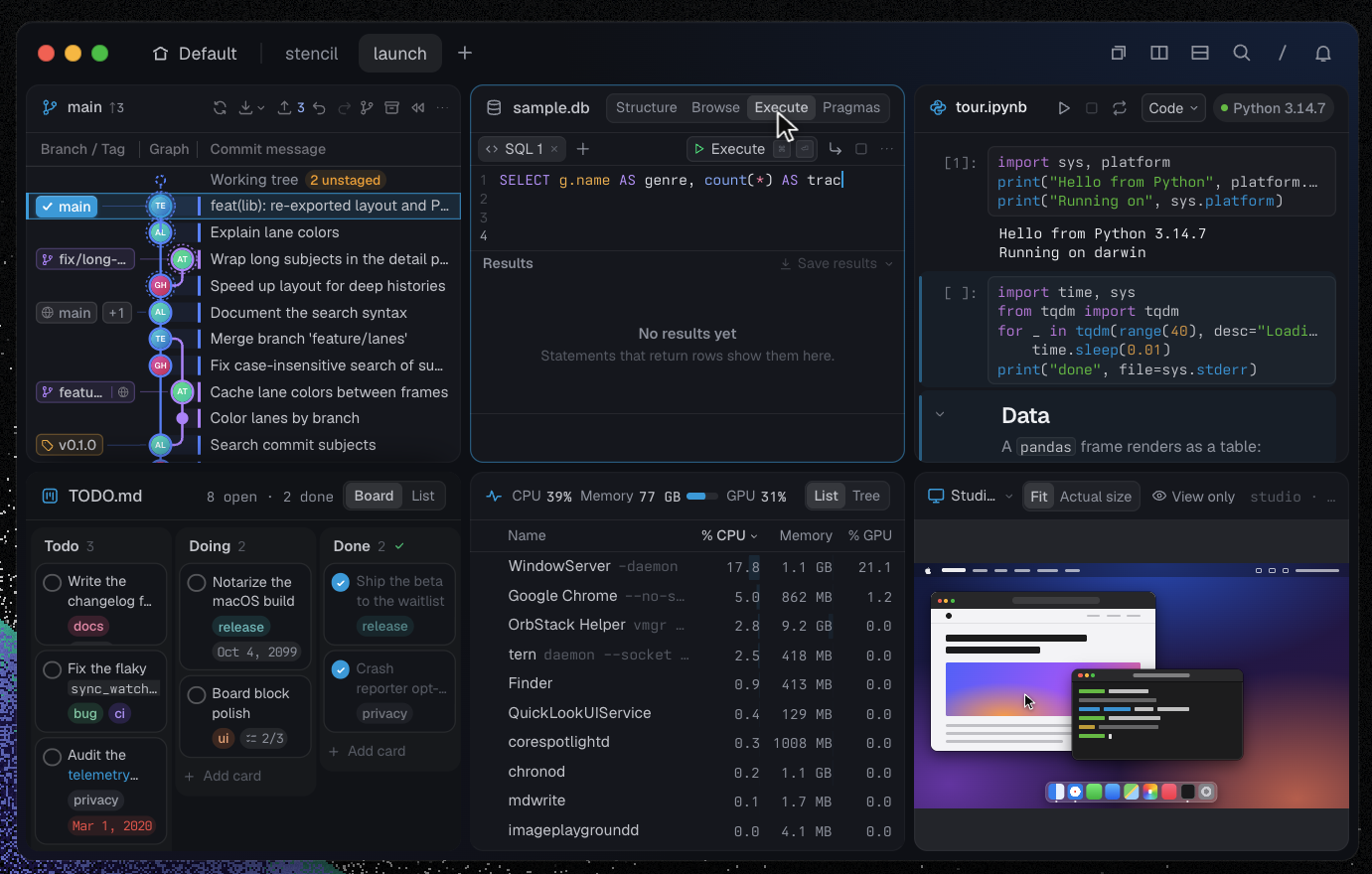
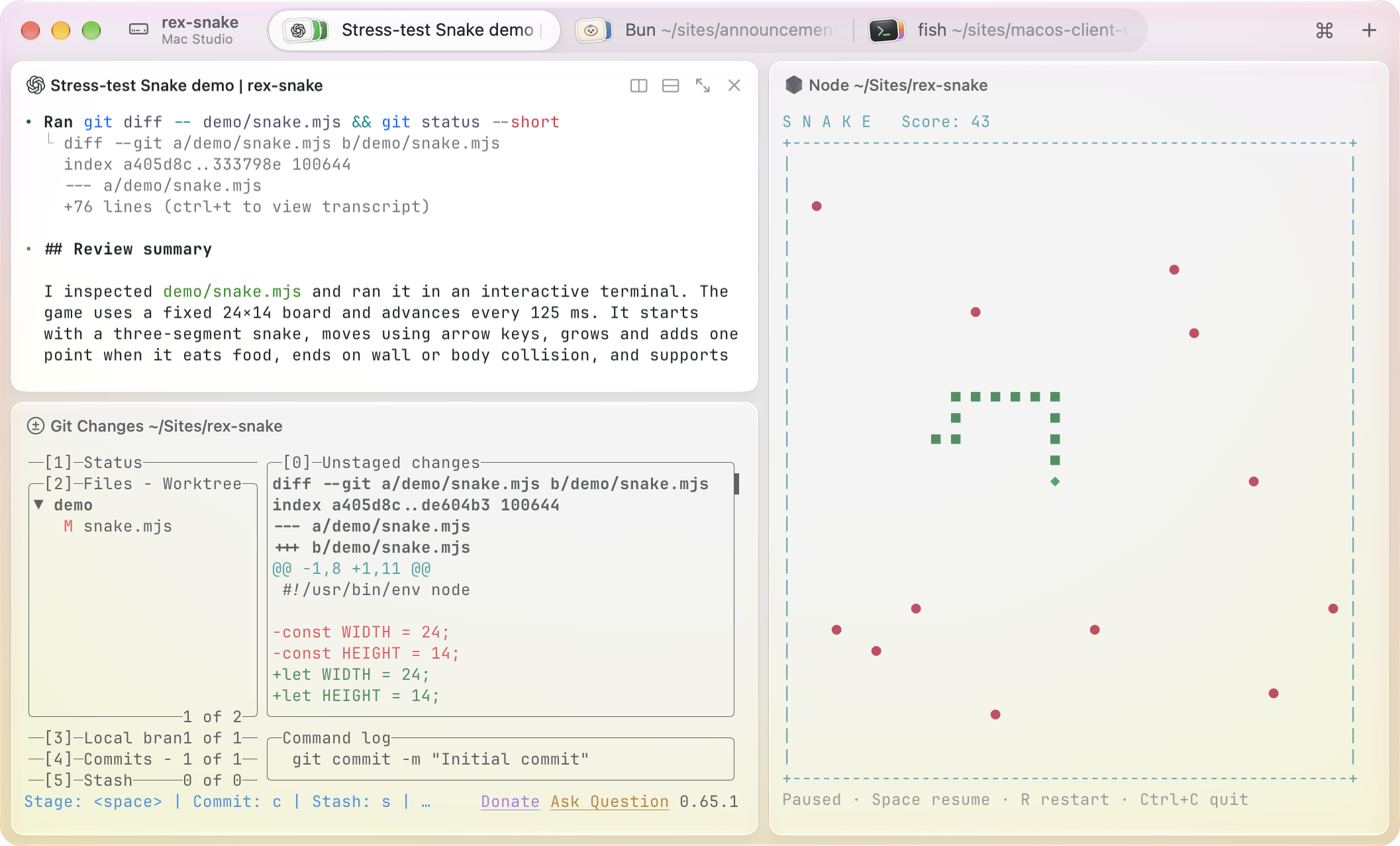
| Feature | Tern | Rex |
|---|---|---|
| Separate client and session daemon | Yes | Yes |
| Sessions persist after closing the window | Yes | Yes |
| Named sessions, tabs and split panes | Yes | Yes |
| Connect to sessions on remote hosts | Yes | Yes |
| CLI/API control of panes and layouts | Yes | Yes |
| Agent-accessible inspection of workspace state | Yes | Yes |
| Custom block plugins | Yes | Yes |
| Built-in rendered Markdown view | Yes | No |
| Built-in browser panes | Yes | No |
| Built-in Git graph and diff views | Yes | No |
| Built-in SQLite browser and query results | Yes | No |
I have thoroughly enjoyed using Tern over the past few weeks as my ADE. I use it at work and also for my personal setup. It’s been fun to vibe code different plugins in Luau and mould this terminal exactly how I want it. I have made two of my plugins public:
I want to find out how much work I can take on without losing track of what I’m responsible for. Starting another agent is easy enough now. What takes time is understanding what it did, checking whether it worked and deciding where to go from there. I’m enjoying shaping Tern around that part of my day. There’s still plenty to figure out, but being able to build the views I need beside the agents doing the work feels like a useful place to start.
You need a manager for infinite minds. You need a superterminal.
Footnotes
-
Tern: product overview, plugin SDK, and scripting and block catalogue. The rich-view rows are documented under file blocks, browser blocks, Git blocks, and SQLite blocks. ↩︎
-
Rex: CLI reference, agent integration, Mac actions, and public testing announcement. ↩︎